
Balance Foundry Buyer’s Guide
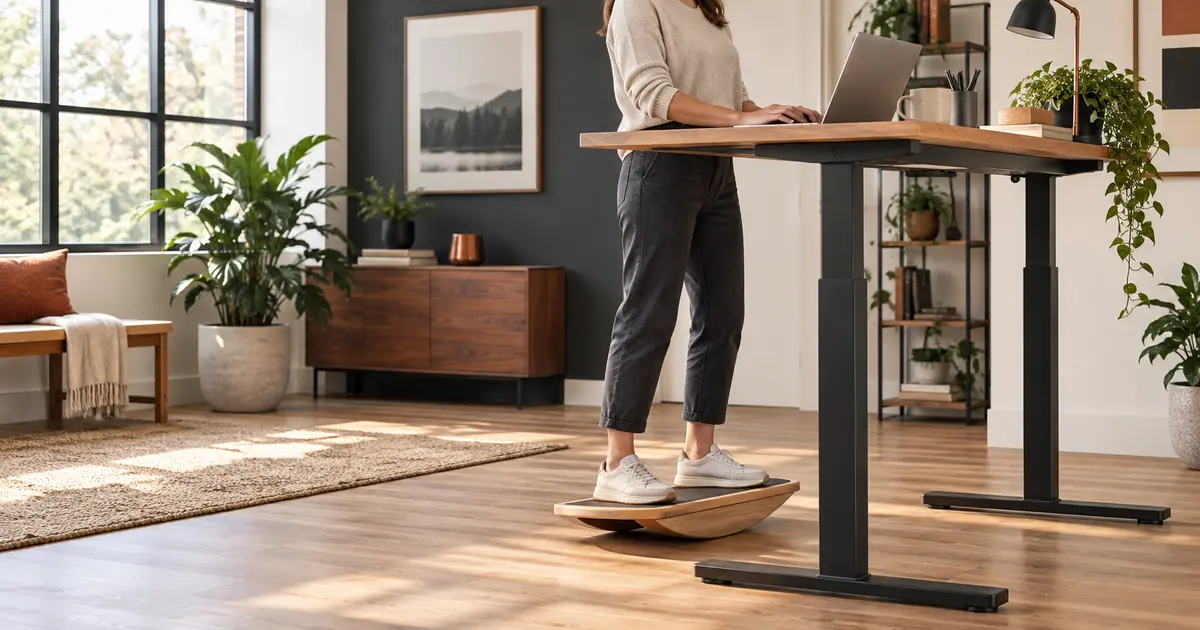
The right standing-desk board should match the task. A controlled rocker can keep your feet moving while you type. A roller board can deliver a genuine balance challenge—but usually belongs in a short work break, not under you during a client call.
If you are shopping for a balance board for a desk, start with one question: do you want gentle movement while working, or a training tool for breaks? For most people, the best everyday option is a low rocker with a predictable side-to-side path. It asks less attention than a roller and is easier to step off.
My top recommendation is the Yes4All Professional Rocker Board. Its broad wooden deck, limited movement path and grippy surface make it the most practical match for routine desk use. If you want a more athletic board for two- to five-minute movement breaks, the Revbalance 101 v2 and Sportneer 7-Mode offer considerably more progression.
Best Balance Boards for Standing Desks: Quick Comparison
| Board | Best for | Movement | Use while typing? | Review basis |
|---|---|---|---|---|
| Yes4All Professional Rocker | Best overall | Predictable side-to-side rock | Yes, after familiarization | Research-based |
| StrongTek Wooden Balance Board | Simple wooden option | Depends on selected rocker version | Yes, with the rocker model | Research-based |
| Revbalance 101 v2 | Premium active breaks | Free-moving roller | Not recommended | Research-based |
| Sportneer 7-Mode | Most versatile | Roller, ball and stop configurations | Only in its easiest controlled setup | Research-based |
| INFIDEZ Balance Surf Trainer | Board-sport progression | Cork roller | No—use for breaks | Hands-on tested |
Important: Amazon listings can combine multiple shapes under one page. Confirm the exact variation, dimensions and capacity before ordering. For continuous desk use, select a rocker rather than a free roller.
How I Chose These Boards
I’m Charlie Brown, a certified personal trainer, nutrition coach and barefoot coach. I evaluated these products by movement type, learning curve, deck space, traction, step-off predictability, progression and how much attention they demand. Those factors matter more at a desk than flashy exercise claims.
The INFIDEZ is the one board here I own and have personally tested. I like its clear progression and ease of use for a roller-style trainer. I have not personally tested the remaining four, so I do not present research-based observations as hands-on experience. Product capacities are manufacturer or retailer claims, not independently verified lab results.
I also separated “work boards” from “break boards.” A challenging board may be excellent equipment and still be a poor platform for concentrated typing. That distinction is why the Revbalance 101 v2—previously left out of a wood-specific guide because its material could not be confirmed—fits properly in this function-based guide.
The 5 Best Balance Boards for Standing Desks
1. Yes4All Professional Rocker Board
The Yes4All Professional Rocker is the strongest fit for people who want movement during desk work. Its rectangular deck and single-axis rocking motion are less distracting than a 360-degree wobble base or loose roller. That means you can shift weight, gently pump the ankles and change pressure without turning every email into balance practice.
The listing describes a wooden deck around 17.5 by 13.5 inches, an anti-slip surface and a listed 350-pound capacity. Those proportions provide more usable foot space than many round wobble boards. It is still unstable equipment, but the fixed arc makes the board’s response easier to anticipate.
Pros
- Predictable movement for desk tasks
- Wide rectangular stance area
- Low-profile, uncomplicated design
Cons
- Only one main movement direction
- Wood can mark delicate floors
- Not a full board-sport simulator
2. StrongTek Wooden Balance Board
StrongTek is a good alternative when you prefer a clean wooden design and straightforward rocking. The brand’s lineup includes different bases, so variation selection matters: the controlled rocker configuration is the one that makes sense beneath a standing desk. A 360-degree model demands more correction and can become distracting during detailed work.
A rocker works well for users who want small, repeatable weight shifts rather than a workout. Its limitations are also its advantage: fewer movement directions mean less novelty, but easier task focus. Place it on a firm, non-slip surface and confirm that your chosen model is compatible with the floor beneath it.
Pros
- Controlled motion suits everyday desk use
- Compact, easy-to-store format
- Simple design with little setup
Cons
- Listing may contain multiple variations
- Limited challenge for advanced users
- Needs floor protection on some surfaces
3. Revbalance 101 v2
The Revbalance 101 v2 earns a place here as a premium movement-break board. Its deck rolls laterally over a separate roller, creating a much larger and faster challenge than a fixed rocker. That makes it engaging for short practice sessions beside the desk—but not my choice for typing, hot drinks or meetings.
Adjustable roller stops help define the travel range, so beginners can start with more control and open the range as skill improves. The large deck also allows stance changes. This is the “excluded” board brought back for the right reason: the earlier concern was unverified wood construction in a wood-only article, not its quality or usefulness as a balance trainer.
Pros
- Substantial progression potential
- Adjustable roller-stop system
- Large deck for athletic stance work
Cons
- Too dynamic for normal typing
- Requires clear floor space
- Premium price compared with rockers
4. Sportneer 7-Mode Balance Board
Sportneer’s 7-Mode system is the best match for someone who wants one product to cover easy practice, roller balance and multidirectional training. The package combines a birch deck with a roller, ball and removable magnetic stops. The manufacturer lists a capacity up to 450 pounds, but always confirm the live listing and selected model before purchase.
Versatility comes with setup decisions. Use the widest, most controlled stop arrangement first. Save the ball and freer roller configurations for an intentional break away from the keyboard. The board’s long footprint also needs more storage and operating room than a compact rocker.
Pros
- Multiple challenge modes
- Adjustable magnetic stops
- Room to progress without replacing the board
Cons
- More parts to store
- Advanced modes are unsuitable for desk tasks
- Longer learning curve than a rocker
5. INFIDEZ Balance Surf Trainer
This is the board I personally use. What stands out is the progression: it is approachable for a roller trainer, yet it does not become boring once basic balance improves. The anti-slip deck and cork roller create the board-sport feel I want for practice, and I have found it easy to introduce in stages.
That does not make it the best platform for eight hours of work. I treat it as training equipment kept near the desk. Step onto it for a focused break, then return to the floor, a rocker or your chair when you need full attention on the screen.
Pros
- Personally tested by Charlie
- Good progression and ease of use
- Engaging for surf and board-sport balance
Cons
- Not suitable for distracted desk work
- Roller requires clear space and practice
- More athletic than office-oriented
How to Choose a Balance Board for Your Desk
Choose the movement before the material
A fixed rocker moves primarily on one axis and is generally the easiest style to combine with computer work. A wobble board tilts in every direction, increasing ankle demand. A roller board allows the deck to travel over a loose fulcrum and requires the most space, skill and attention. For more detail, see our wobble board vs. balance board comparison.
Prioritize usable deck space and traction
Your feet should fit without crowding the edges. More stance room lets you change position rather than locking into a single posture. A grippy surface matters, but aggressive texture can be uncomfortable barefoot. As a barefoot coach, I prefer secure contact without assuming that barefoot use is right for every person or workplace.
Check height and desk adjustment
A board raises your body. Re-adjust the desk so your elbows can remain comfortably near your sides and your screen stays at an appropriate viewing height. If the desk cannot rise enough, the board may worsen the workstation even if it feels good underfoot.
Match difficulty to the work
The best desk board is not the hardest board you can survive. It is the one that allows small position changes without hijacking your concentration. Use a separate advanced board if you want athletic training. Beginners can start with our balance board exercises for beginners.
How to Use a Balance Board Safely at a Standing Desk
- Clear the area. Move cords, mugs, rolling chairs and hard objects out of the likely step-off path.
- Learn away from the desk. Practice mounting, rocking and stepping off before adding work tasks.
- Use stable support if needed. A wall or fixed countertop is preferable to pulling on a height-adjustable desk that may roll or shift.
- Begin with short sessions. Stop before fatigue changes your control. Duration should grow only if the board remains comfortable and predictable.
- Alternate positions. Rotate among sitting, ordinary standing, walking and board use. A balance board is one option, not a cure for staying in any position too long.
Research on workplace standing supports a cautious approach. Prolonged static standing is associated with discomfort and other concerns, while a small crossover study found that balance-board desk work increased energy expenditure compared with sitting without reducing measured productivity. That is interesting—not proof that everyone should balance all day. Frequent, comfortable position changes remain the more defensible goal.
Health note: If you have recent injury, dizziness, reduced sensation, a history of falls or a condition affecting balance, ask a qualified clinician whether unstable-surface training is appropriate. Pain is a stop signal, not a progression strategy.
Frequently Asked Questions
Are balance boards good for standing desks?
They can add movement and variety, but the type matters. A controlled rocker is the most practical for simultaneous work. Roller boards are better treated as equipment for short, intentional breaks.
Can I use a balance board all day?
I would not. Alternating sitting, standing, walking and brief board sessions avoids replacing prolonged sitting with prolonged unstable standing. Let comfort, control and your health history guide duration.
Which board is best for beginners?
A fixed rocker such as the Yes4All Professional Rocker is the easiest starting point in this group. Its movement is more constrained and predictable than a loose roller.
Can I type while using a roller balance board?
Some experienced users may be able to, but it adds avoidable fall and distraction risk. Use the Revbalance, Sportneer roller modes and INFIDEZ for focused movement breaks, then return to a stable surface for detailed work.
Will a balance board protect me from the effects of sitting?
No single product cancels out an otherwise inactive day. A board can be one tool within a routine that includes position changes, walking and regular physical activity.
Final Recommendation
For most standing-desk users, buy the Yes4All Professional Rocker Board. Its constrained motion is the best compromise between movement and concentration. Choose the Revbalance 101 v2 if you want a premium trainer for active breaks, or the Sportneer 7-Mode if progression and configuration variety matter most. The INFIDEZ remains my hands-on choice for a board-sport-style session—not a platform for answering email.
See Best Overall on Amazon Explore the Balance Board Hub
Research and Product Sources
- Nelson et al. (2018): balance-board standing, energy expenditure and workplace productivity
- Waters and Dick (2015): review of health risks associated with prolonged standing at work
- Sportneer product information
- Current manufacturer and retailer listings for dimensions, materials, configurations and stated capacities. Product details may change.
Leave a Reply